Page 2 of 2
Posted: Mon Dec 12, 2011 10:06 am
by wesk
Army Mechanics Training manual.
Posted: Mon Dec 12, 2011 11:27 pm
by Cacti_Ken
Your light switch has been painted over? Get a pencil tip paint brush and some white paint and restore the letters. It's easy to do.
I use those small tip brushes to touch up nicks in the OD.
Posted: Tue Dec 13, 2011 1:24 am
by evanso1975
These fine tip paint markers work well too:
http://www.dykem.co.uk/english/britemarkfine.php
I did the red warning lettering on my regulator with one. Worked for me; the hands tend to shake if I haven't had a beer.

Posted: Tue Apr 25, 2017 10:50 am
by MemphisTR
Hello, I am new to this forum and hope that someone can help. I have just begun a rebuild of a 1952 M38. I have had the carburetor rebuilt, new plugs, batteries, tires, master cylinder, brake cylinders and the M38 is running well, besides a small oil leak that will require another trip the the mechanic. Before I address the leak, I'm going to start working on the body, seats and electrical. I have been reading this thread because I cannot get the headlights to work but I know the bulbsare good. I cannot figure out how to unlock the light switch. I've tried pushing the knob in andto try and turn it to unlock, pulling thr knob out to turn it, and just trying to turn it in its current position but the unlock knob will not budge. Since I have never used the light control on any M38, I don't know how it is supposed to work. It might sound pretty simple but I can't figure it out, any suggestions?
Posted: Tue Apr 25, 2017 2:45 pm
by RICKG
The "unlock" lever should move up with simple thumb pressure, no pushing or pulling..
Posted: Tue Apr 25, 2017 6:14 pm
by 4x4M38
As Rick said. The bottom right lever is the lock lever. There is an arrow
to the right and above the lever. You have to push the lever up while
moving the other lever. It's spring loaded and won't stay when you push it up.
Posted: Wed Apr 26, 2017 12:17 pm
by MemphisTR
I will be back home tonight and will try again. I did try to simply apply thumb pressure and thr lock lever would not budge at all. What is funny is that I can move the top lever 1 click and the bottom left lever 3 or 4 clicks without moving the lock lever. However I can't see what the settings are on the control and I have not seen anything happen with the lights. Thank you
Posted: Wed Apr 26, 2017 10:01 pm
by wesk
won't stay when you push it up.
It would probably sound better if you say it won't stay up when you release your thumb pressure.

The other two levers are free to move in several positions. The unlock lever is only needed to move the other levers to non-black out operating positions. The lock lever only prevents you from illuminating the service drive lights at night in a combat area.
Again, I remind folks to visit my photo gallery when you have questions and most of the answers are lying right there. My photo gallery is the 2nd gallery in "Member's Albums":
http://www.willysmjeeps.com/v2/modules. ... _album.php
In my M38 Electrical Gallery you will find this:
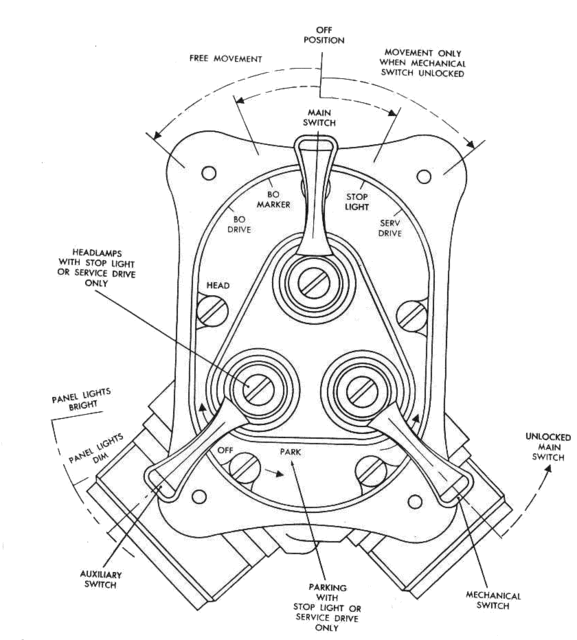
and this:
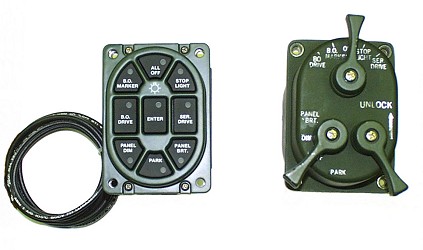
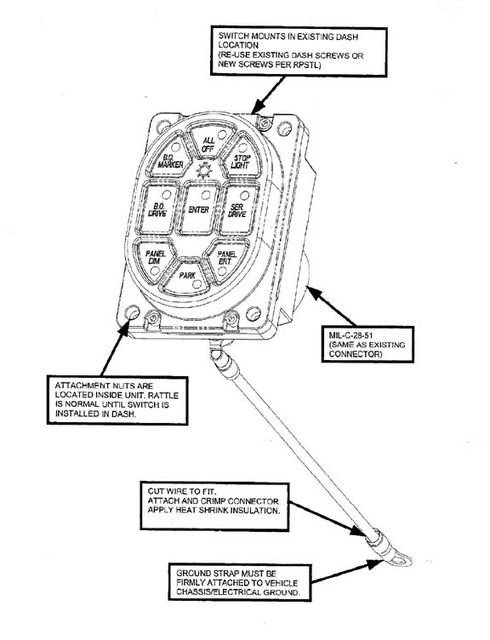
And this instruction for the push button switch:
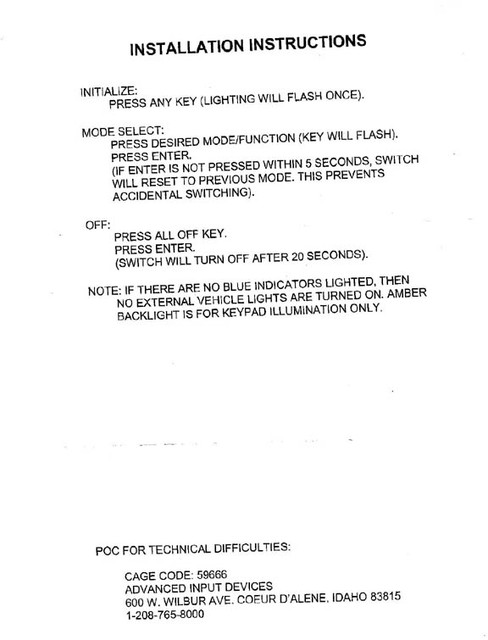
On page 2 of my Gallery you can find this sub-gallery called "M series lighting":
http://www.willysmjeeps.com/v2/modules. ... _album.php
And within that sub-album is this sub-album called the "M Series Light Switch":
http://www.willysmjeeps.com/v2/modules. ... _album.php
Where you will find these as well:
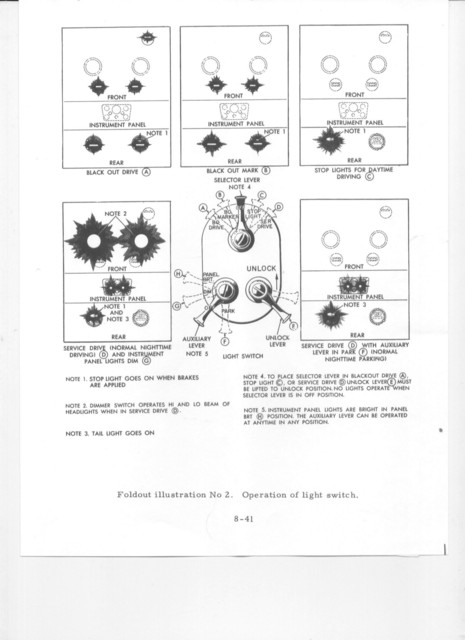
Posted: Thu Apr 27, 2017 1:31 pm
by MemphisTR
Wonderful. This helps a ton. Plane was delayed so I did not get to check it last night. Just have to figure out why it will not unlock. Thanks again. Now I also know about your gallery which should be great.